[Flutter] Dio 통신
The official repository for Dart and Flutter packages.Pub is the package manager for the Dart programming language, containing reusable libraries & packages for Flutter and general Dart programs.pub.dev dio install | Dart packageA powerful HTTP networki
maze910.tistory.com
dependencies:
  flutter:
    sdk: flutter


  # The following adds the Cupertino Icons font to your application.
  # Use with the CupertinoIcons class for iOS style icons.
  cupertino_icons: ^1.0.6
  dio: ^5.7.0
import 'package:dio/dio.dart';
import 'package:flutter/material.dart';

void main() => runApp(MyApp());

class MyApp extends StatelessWidget {
  const MyApp({super.key});

  @override
  Widget build(BuildContext context) {
    return MaterialApp(
      home: SafeArea(
        child: MyHomePage(),
      ),
    );
  }
} // stl 위젯이다

class MyHomePage extends StatefulWidget {
  const MyHomePage({super.key});

  @override
  State<MyHomePage> createState() => _MyHomePageState();
}

// StatefulWidget 에 연개된 클래스가 State 클래스다.
class _MyHomePageState extends State<MyHomePage> {
  // 통신 ---> 통신 클라이언트 클래스가 필요하다.
  Dio _dio = Dio();

  @override
  void initState() {
    super.initState();
    // 통신 요청 함수 호출
    _fetchTodos();
  }

  // 화면을 그려주는 함수
  @override
  Widget build(BuildContext context) {
    return const Placeholder();
  }

  // 통신을 담당하는 함수 ---> MVC -> MVVM ->MVVM + 클린아키텍처
  Future<void> _fetchTodos() async {
    Response response =
        await _dio.get('https://jsonplaceholder.typicode.com/todos/1');
    // 통신코드 작성 시 반드시 -- 예외 처리 코드!
    try {
      // 응답 후 아래로 코드가 실행되게 흐름을 만들고 싶다면 ..
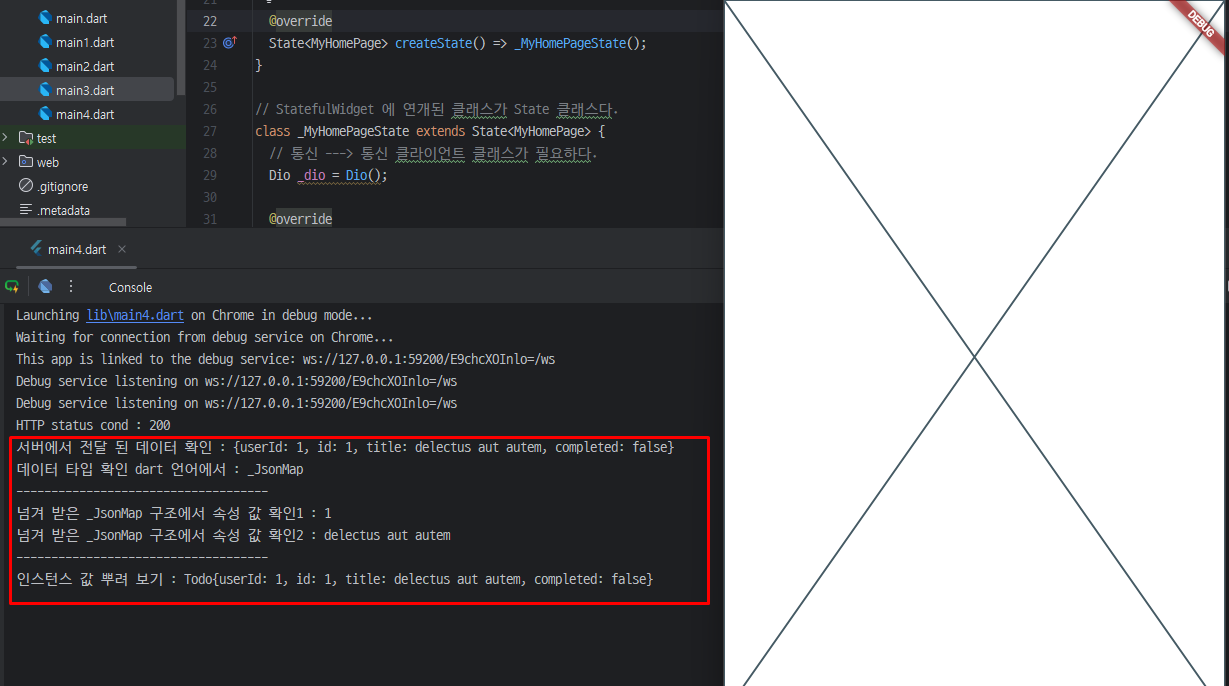
      print('HTTP status cond : ${response.statusCode}');
      print('서버에서 전달 된 데이터 확인 : ${response.data}');
      print('데이터 타입 확인 dart 언어에서 : ${response.data.runtimeType}');

      print('------------------------------------');
      print('넘겨 받은 _JsonMap 구조에서 속성 값 확인1 : ${response.data['userId']}');
      print('넘겨 받은 _JsonMap 구조에서 속성 값 확인2 : ${response.data['title']}');
      print('------------------------------------');
      // respones.data에서 ---> Todo 객체를 만드는 것이 목표
      //Todo newTodo = new Todo();
      Todo newTodo = Todo(
          userId: response.data['userId'],
          id: response.data['id'],
          title: response.data['title'],
          completed: response.data['completed']);

      print('인스턴스 값 뿌려 보기 : ${newTodo.toString()}');

      // newTodo.userId = response.data['userId'];
      // newTodo.id = response.data['id'];
      // newTodo.title = response.data['title'];
      // newTodo.completed = response.data['completed'];
    } catch (e) {
      print('네트워크 오류 발생 또는 파싱 오류 발생... : ${e.toString()}');
    }
  }
}

class Todo {
  int? userId;
  int? id;
  String? title;
  bool? completed;

  // {} 생성자 옵션널은 말 그대로 옵션값이다.
  Todo(
      {required this.userId,
      required this.id,
      required this.title,
      required this.completed});

  @override
  String toString() {
    return 'Todo{userId: $userId, id: $id, title: $title, completed: $completed}';
  }
}SafeArea: 화면 상단이나 하단의 기기 영역(노치, 상태바 등)과 겹치지 않도록 안전한 영역에 콘텐츠를 배치합니다.
Dio: Dio는 HTTP 요청을 보내기 위해 사용하는 패키지입니다. 여기서 Dio 객체를 생성하여 이후 HTTP 요청에 사용할 준비를 합니다.
initState: State 클래스에서 제공하는 메서드로, 위젯이 생성될 때 한 번 호출됩니다. 여기서 super.initState()를 통해 부모 클래스의 초기화 작업을 먼저 수행하고, 이후에 _fetchTodos() 메서드를 호출하여 서버에서 데이터를 가져옵니다.
async/await: 이 함수는 Future를 반환하며 비동기 방식으로 작동합니다. 비동기 작업을 수행하면 앱이 멈추지 않고 계속 동작할 수 있습니다.
Todo 객체 생성:
- 서버에서 받은 JSON 데이터(response.data)의 각 항목(userId, id, title, completed)을 이용해 Todo 객체를 생성합니다.
- 이 예제에서는 JSON 데이터를 Todo라는 모델 객체로 변환하여 데이터 구조를 더 명확하게 정의합니다.
'Flutter' 카테고리의 다른 글
| [Flutter] MVVM 패턴이란? (0) | 2024.11.13 |
|---|---|
| [Flutter] Monolithic (모노리스) 구조의 특징 (0) | 2024.11.13 |
| [Flutter] Dio 통신 (0) | 2024.11.12 |
| [Flutter] TabBar 위젯 (0) | 2024.11.12 |
| [Flutter] BottomSheet 위젯 (0) | 2024.11.12 |